





LEARN MORE



Find and Message a JOHSC
A health authority user can search and message their own HA committee members if there is a problem, issue, concern, or suggestion. This functionality is open to all HA users who have registered an account with the OHS Resource Centre.
Applies to:
- All Health Authority roles listed below:
- Admin Assistant (dedicated support for committee)
- Committee Co-Chair (worker and employer)
- Committee Regular Member
- Committee Alternate Member
- Employer Practitioner
- General Health Authority Staff (staff worker and health authority-trusted network)
- Union Practitioner
Note:
- The System Administrator can send messages to all the HA committee members (See screenshot below)

- Click the ‘Find a JOHS Committee’ tab on the page’s header.
- Write the committee’s name or part of it in the research tool, select its health authority or affiliation, and then, click the ‘Search for Committee’ button.
- Click on the committee’s name.
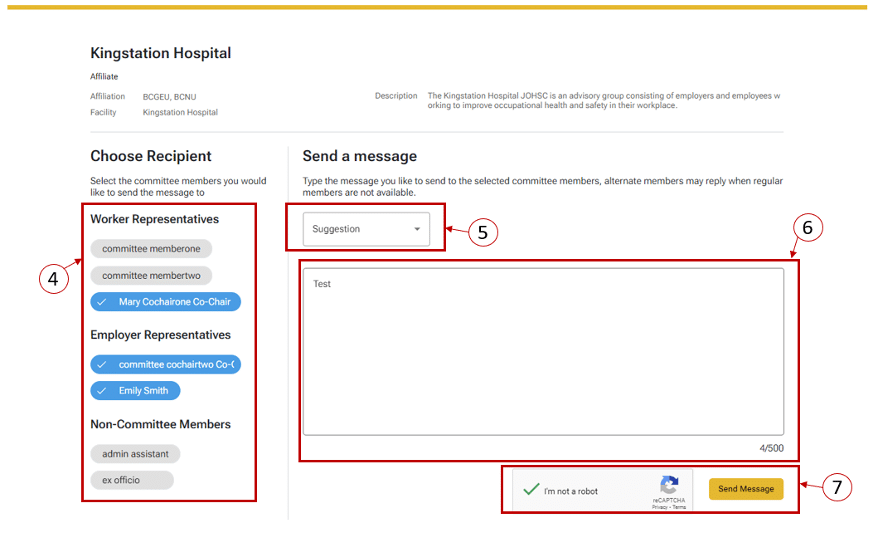
- Choose the desired recipient for your message; the Co-Chairs are selected by default, but you can deselect.
- Select the type of message you would like to send to the selected committee members.
- Enter your message. The maximum length is 32,000 characters.
- Check the ‘I’m not a robot’ functionality and click the ‘Send Message.’
Note
- The system only displays the first and last names of committee members.